Hello, my name is Faizan Husain
I'm a
I deliver modern high quality applications that help turn ideas into
impactful products, with focus on seamless user experience and
scalable architecture.

About
I'm Faizan Husain and The Developer
Focused on building modern, scalable, and user-centric digital solutions. I specialize in transforming ideas into functional and high-performance applications that deliver real value. My approach combines clean design, efficient architecture, attention to detail and a strong focus on quality ensure that every product is reliables and built for long-term growth.
Age :
Web :faizanhusain.in
Email :faizan.ndb@gmail
Qualification : MCA
Phone :+91 9272399002
City :Nandurbar (INDIA)
Teaching : Available
Freelance : Available
FRONTEND DEVELOPMENT
BACKEND DEVELOPMENT
DATABASE MANAGEMENT
REST-API DEVELOPMENT
API TESTING VIA POSTMAN
Education
2020 - 2021
DCA @ STP Education, New Delhi
Percentage: 90%
Diploma in Computer Applications (DCA) through STP Education under the Ministry of MSME Government of india, focusing on computer fundamentals, office tools, and software concepts.
2021 - 2024
BCA @ NMU Jalgaon University
CGPA: 9.31/10
Graduated in Bachelor of Computer Applications (BCA) from North Maharashtra University with an A+ grade, building a strong foundation in software development and computer applications.
2024 - 2026
MCA @ SPPU Pune University
CGPA: 8.41/10
Master of Computer Applications (MCA) from Savitribai Phule Pune University (SPPU) with an A+ academic performance and focus on advanced software development technologies.
Experience
July 2026 - Present ( )
Software Developer @ Data Annotation, Remote
Worked on AI-assisted software development and code evaluation, Reviewed and improved programming solutions across different systems.
Jan 2026 - June 2026 ( 6 months )
Software Developer Intern @ NJ Group, Surat
Built REST APIs for the (IMS GRC) system using Spring Boot, integrated frontend with MySQL database and used Postman for API testing.
Nov 2024 - Nov 2025 ( 1 Year )
Hackathon Volunteer @ DYPSOMCA (SPPU University)
Worked as a Hackathon Volunteer and helped manage event activities, participant support, and technical coordination during the hackathon.
Services
Backend Development
Building secure, scalable, and high-performance server-side applications, with clean architecture and optimized performance.
Frontend Development
Creating responsive and user-friendly interfaces with smooth performance and seamless integration with backend systems.
RESTful APIs Development
Designing and integrating RESTful APIs for efficient communication between systems, ensuring reliability, security, and performance.
Database Management
Structuring and managing databases for optimized performance, data integrity, and scalability across applications.
Authentication & Security
Implementing secure authentication systems, role-based access control, and data protection for robust and reliable applications.
RestAPI Testing
Ensuring API reliability, performance, and accuracy through thorough testing, validation, and debugging for seamless system integration.
Projects
Featured Projects

IMS System for (Governance Risk & Compliance)
+Overview
RESOLVEX incident management system (IMS) aims to systematically capture, classify, assess, investigate, resolve, and report incidents that impact Governance, Risk, and Compliance (GRC) obligations of an organization. The system ensures accountability, traceability, regulatory compliance, and continuous improvement through structured incident
Features
- - Incident Reporting
- - Lifecycle Management
- - Role-Based Authorization (RBAC)
- - BCrypt Encryption
- - Email Notification
- - Incident Tracking
- - Audit Logging
- - CAPA Management
- - REST API Integration
- - Dynamic Reports & Dashboard
Requirement Understanding
- 01. Centralized incident management platform
- 02. Secure role-based access control
- 03. Incident reporting and tracking system
- 04. CAPA management workflow
- 05. Risk assessment
- 06. Investigation and root cause tracking
- 07. Notification and status updates
- 08. Audit history
Planning & Architecture
✅ System Architecture
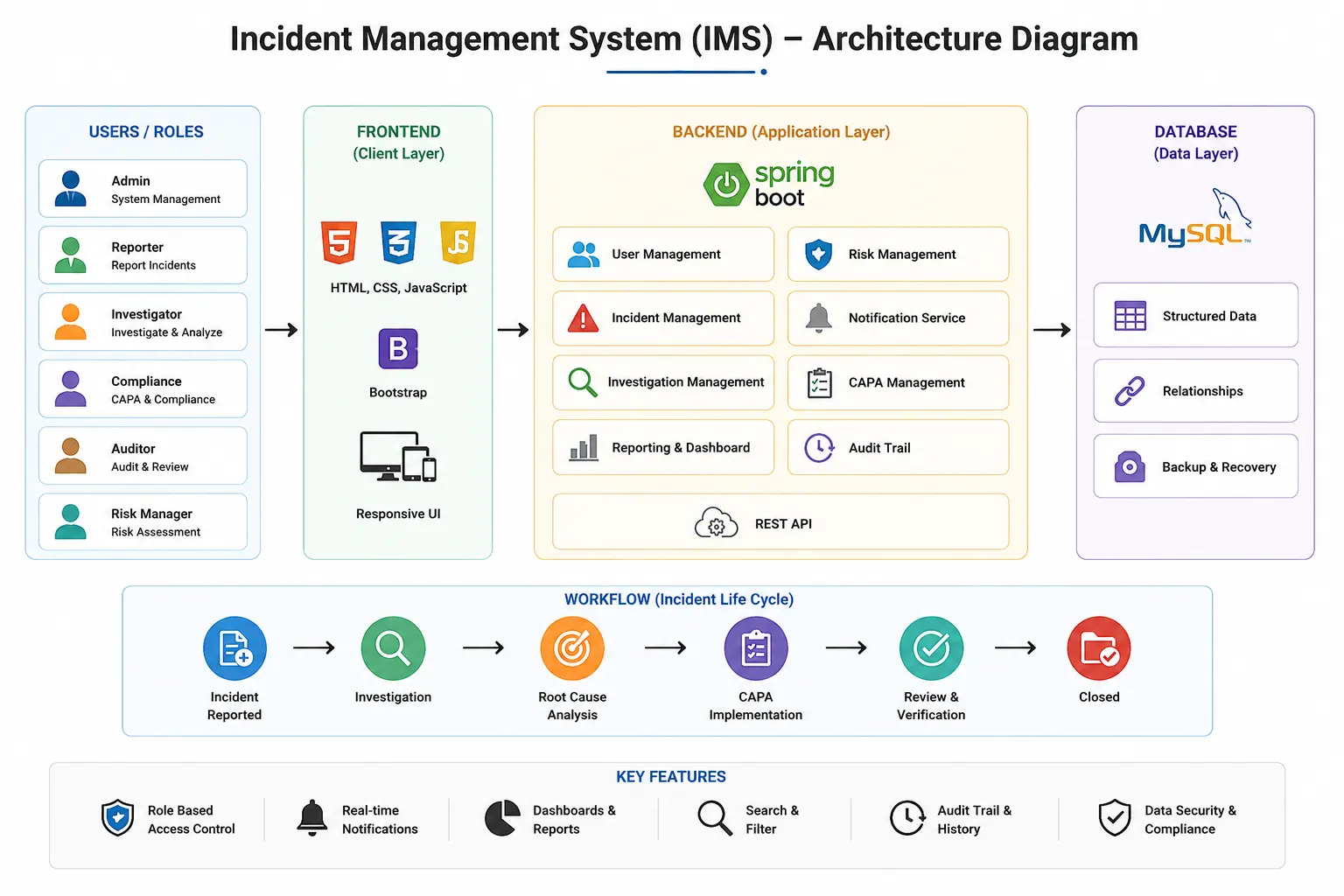
System architecture | Resolvex
✅ Database Design
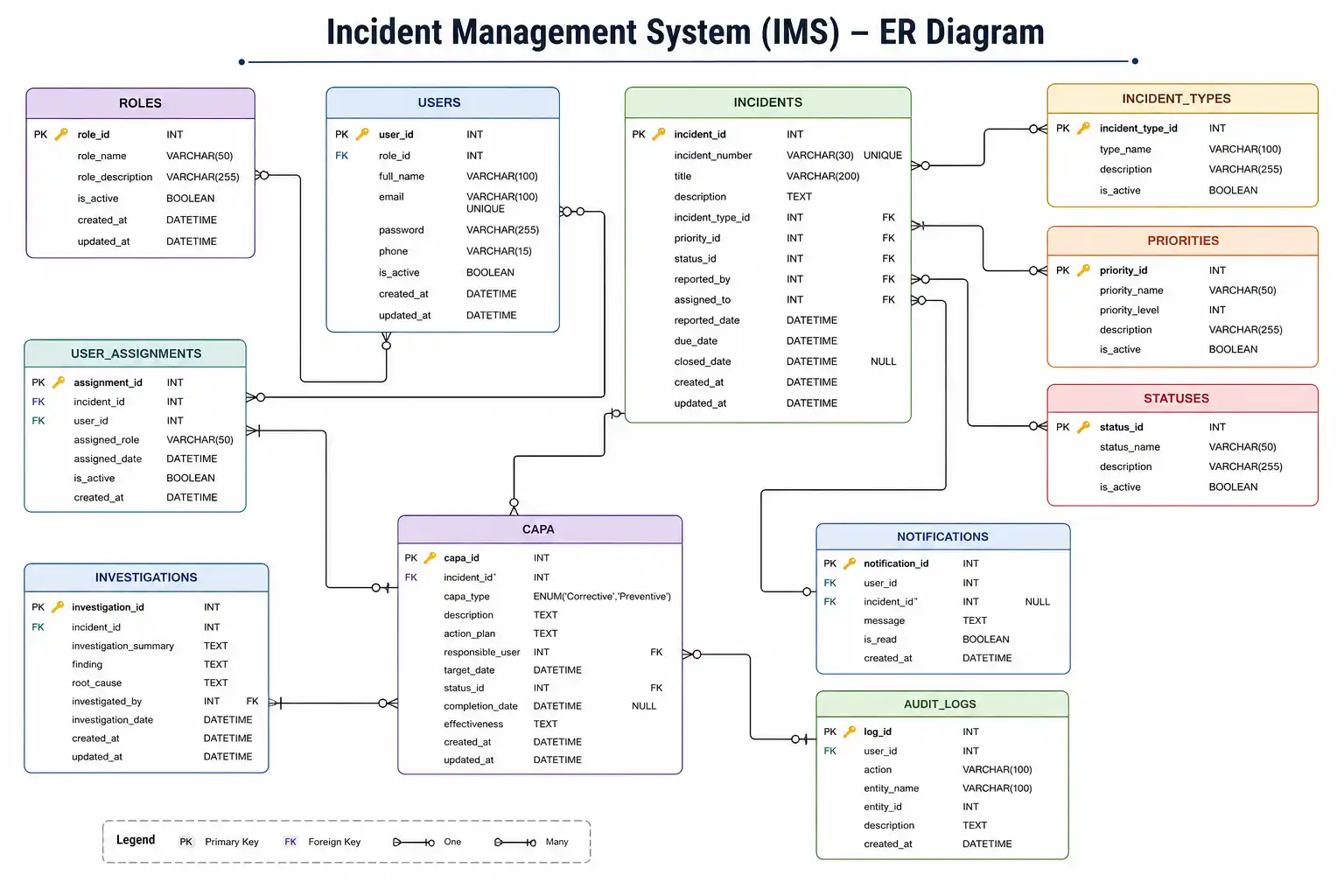
Database design | Resolvex
✅ Workflow Diagram
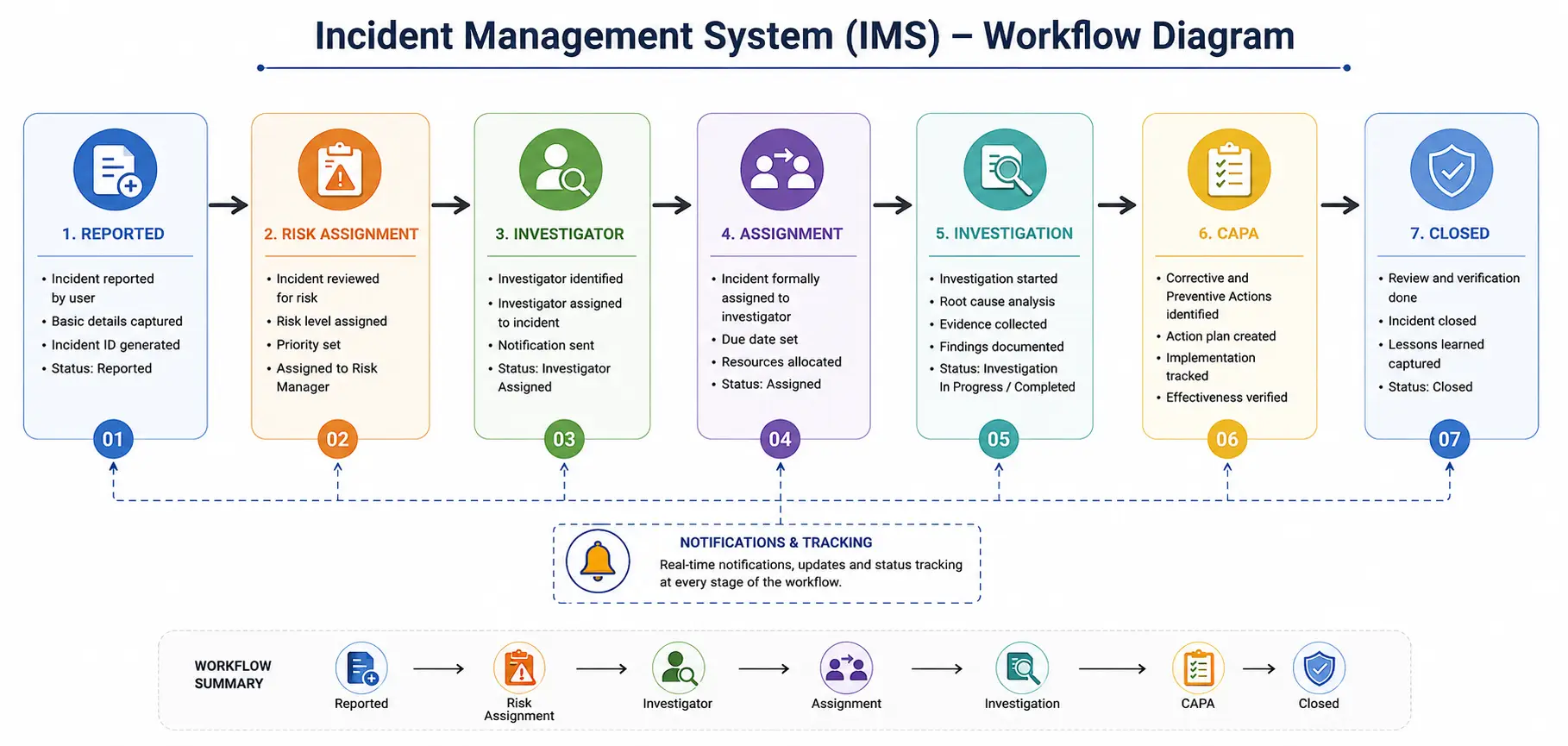
Workflow diagram | Resolvex
✅ Folder structure
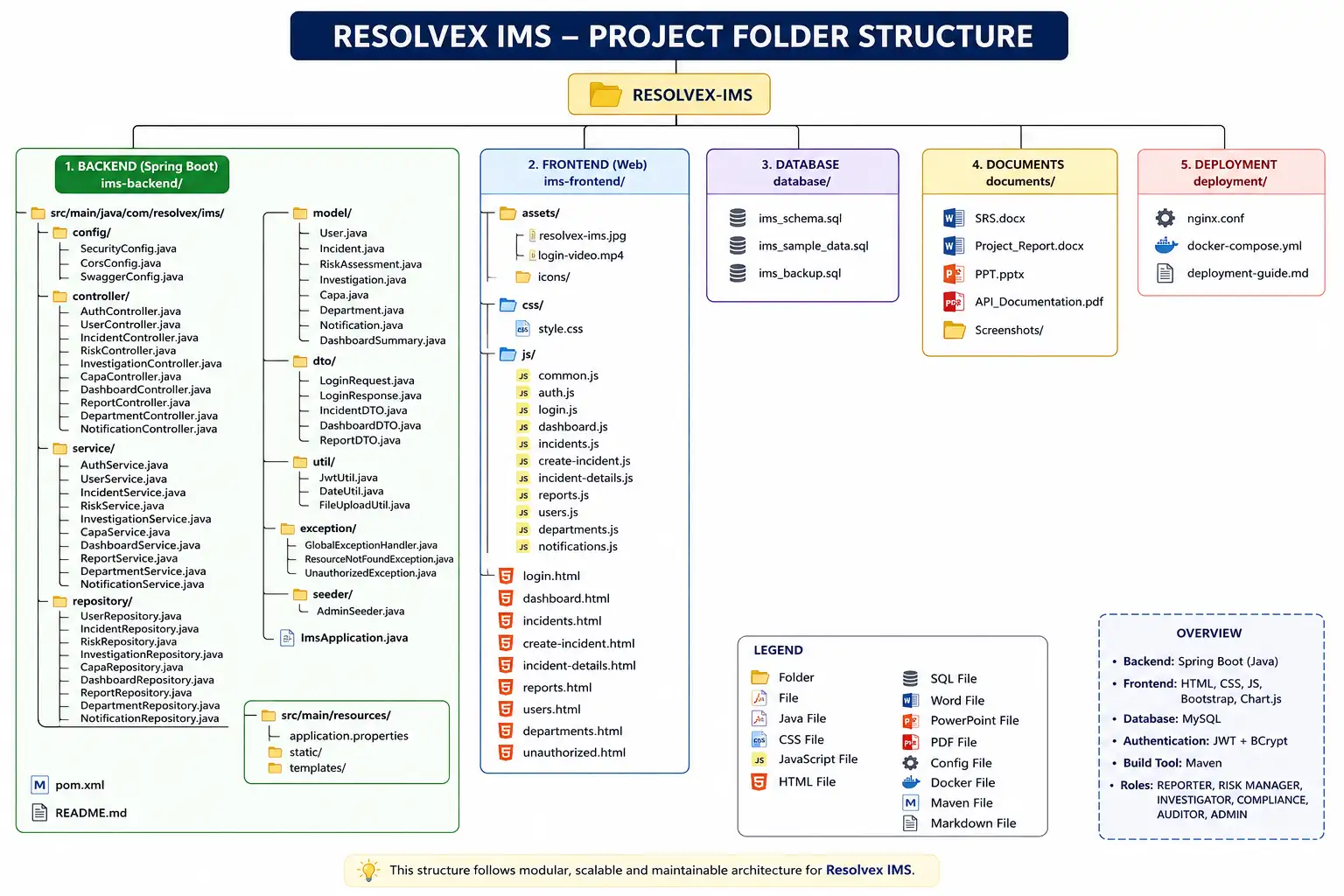
Folder structure | Resolvex
Github Code Snippets

faizan-husain
Software Developerpackage com.resolvex.ims.model;
import lombok.Getter;
import lombok.Setter;
import java.time.LocalDateTime;
@Getter
@Setter
public classIncidentMaster {
private Integer incidentId;
private String title;
private String description;
private LocalDateTime incidentDatetime;
private LocalDateTime reportedDatetime;
private String source;
private String category;
private Integer departmentId;
private String location;
private Integer reportedBy;
private String status;
private Integer assignedTo;
}
// LOGIN API
@PostMapping("/auth/login")
public ResponseEntity<?> login(@RequestBody Map<String, String> req) {
    User user = service.login(
            req.get("email"),
            req.get("password")
    );
    if (user != null) {
        String roleName = userRepository.findRoleNameByUserId(user.getUserId());
        LoginResponse res = new LoginResponse();

        res.setUserId(user.getUserId());
        res.setName(user.getName());
        res.setRole(roleName);
        res.setDepartmentId(user.getDepartmentId());

        return ResponseEntity.ok(res);
    }
    return ResponseEntity
            .status(HttpStatus.UNAUTHORIZED)
            .body(Map.of("message","Invalid credentials"));
}
// incident STATUS update (BL)
public void updateIncidentStatus(int incidentId,String newStatus,int userId){
    if (newStatus == null || newStatus.isBlank()) {
        throw new IllegalArgumentException("status can't be empty");
    }
    String currentStatus = repo.getStatusByIncidentId(incidentId);

    // Status update only if different
    if (!newStatus.equals(currentStatus)) {
        repo.updateStatus(incidentId,newStatus);
        auditLogService.logAction(incidentId,"STATUS UPDATED TO " + newStatus,userId);
    }

    // SLA END MUST ALWAYS RUN WHEN STATUS = CLOSED
    if ("CLOSED".equals(newStatus)) {
        System.out.println("SLA END TRIGGERED FOR INCIDENT " + incidentId);
        incidentSlaService.endSla(incidentId);
    }
}
@Repository
public class UserRepository {
    private final JdbcTemplate jdbcTemplate;
    public UserRepository(JdbcTemplate jdbcTemplate) {
        this.jdbcTemplate = jdbcTemplate;
    }
    // CREATE USER (DB)
    public void save(User u){
        String sql = """
            INSERT INTO users(name,email,password,role_id,department_id,status)
            VALUES (?,?,?,?,?,?)
            """;
        jdbcTemplate.update(
            sql,
            u.getName(),
            u.getEmail(),
            u.getPassword(),
            u.getRoleId(),
            u.getDepartmentId(),
            u.getStatus()
        );
    }
}
import org.springframework.context.annotation.Bean;
import org.springframework.context.annotation.Configuration;
import org.springframework.security.crypto.bcrypt.BCryptPasswordEncoder;
@Configuration
public class BCryptConfig {
    @Bean
    public BCryptPasswordEncoder passwordEncoder(){
        return new BCryptPasswordEncoder();
    }
    // PASSWORD ENCRYPTION
    public String encodePassword(String password){
        return passwordEncoder().encode(password);
    }
}
// ROLE-BASED ACCESS CONTROL & USER SESSION MANAGEMENT JAVASCRIPT
const role = (localStorage.getItem("role") || "").trim().toUpperCase();
const allowedRoles = [
    "REPORTER",
    "INVESTIGATOR",
    "ADMIN",
    "COMPLIANCE",
    "AUDITOR",
    "RISK MANAGER"
];
if (!allowedRoles.includes(role)) {
    alert("Unauthorized access");
    window.location.href = "login.html";
}
const userId = localStorage.getItem("userId");
const userName =localStorage.getItem("userName");
document.getElementById("navUserName").innerText = userName;
document.getElementById("navRole").innerText = role;
<!-- MAVEN DEPENDENCIES -->
<!-- spring-boot dependency -->
<dependencies>
<dependency>
<groupId>org.springframework.boot</groupId>
<artifactId>spring-boot-starter-web</artifactId>
</dependency>

<!-- security dependency -->
<dependency>
<groupId>org.springframework.boot</groupId>
<artifactId>spring-boot-starter-security</artifactId>
</dependency>

<!-- mysql dependency -->
    <dependency>
        <groupId>mysql</groupId>
        <artifactId>mysql-connector-j</artifactId>
    </dependency>
</dependencies>
# ResolveX IMS
Incident Management System developed using
Spring Boot, JDBC, MySQL, HTML, CSS, JavaScript and Bootstrap.

## Features
- Role Based Access Control
- Incident Reporting
- Investigation Workflow
- CAPA Management
- SLA Tracking
- Audit Logs

## Technology Stack
- Java
- Spring Boot
- JDBC
- MySQL
- Bootstrap
- JavaScript

## Developed By
Faizan Husain
Software Developer
this is sample code, click @github to get full repository
Testing
✅ Unit Testing
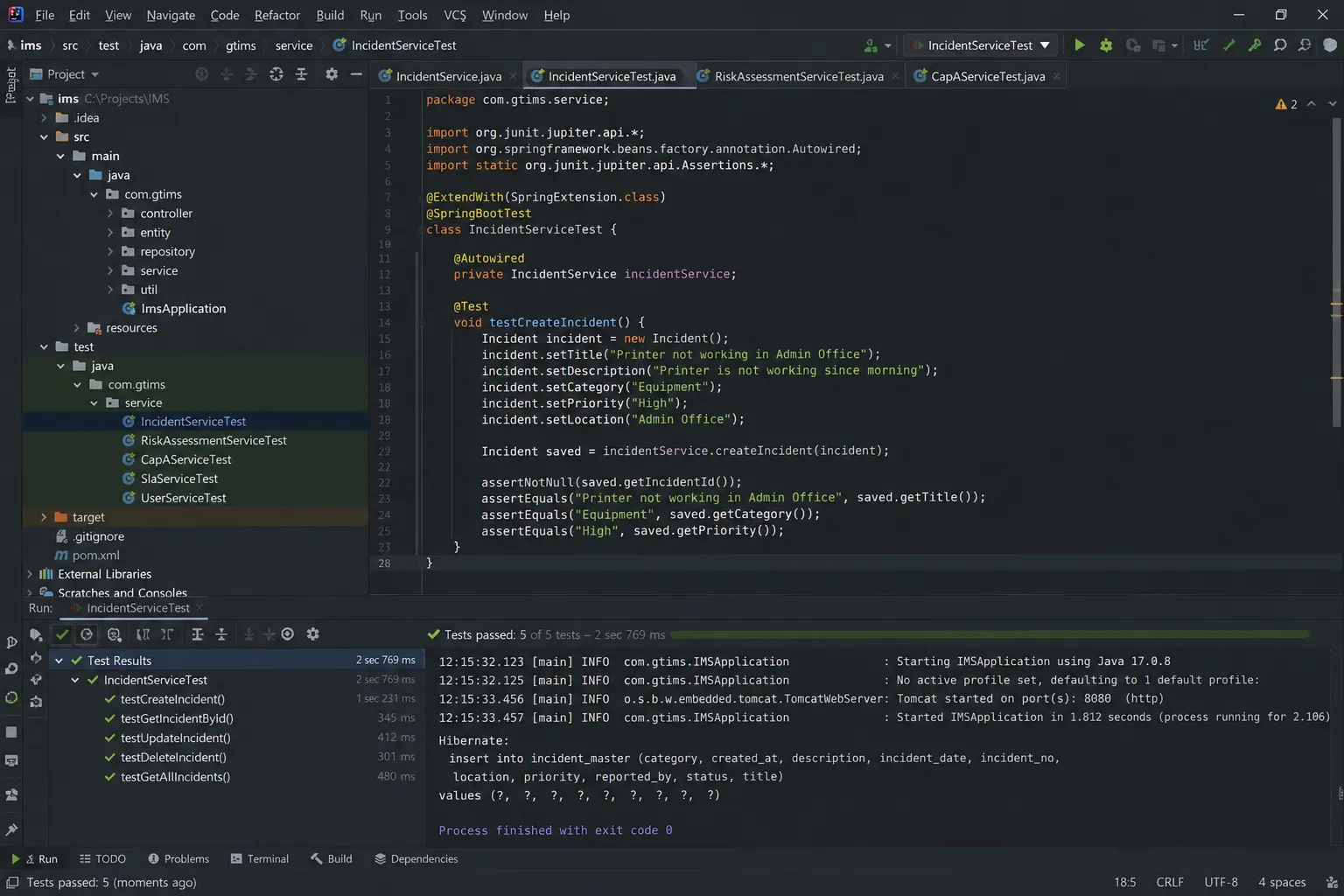
JUnit testing | Resolvex
✅ API Testing
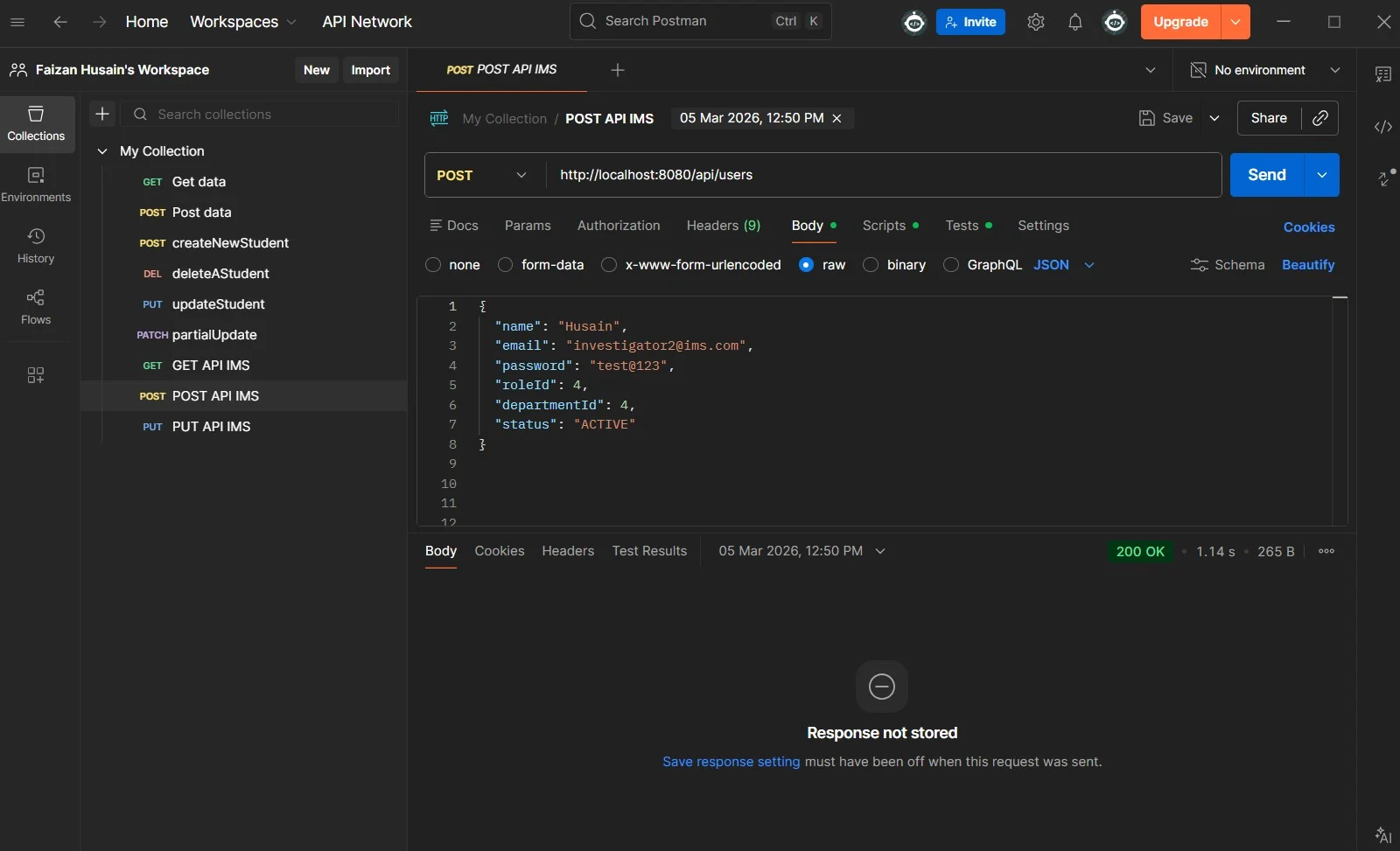
API testing via postman | Resolvex
✅ Integration Testing
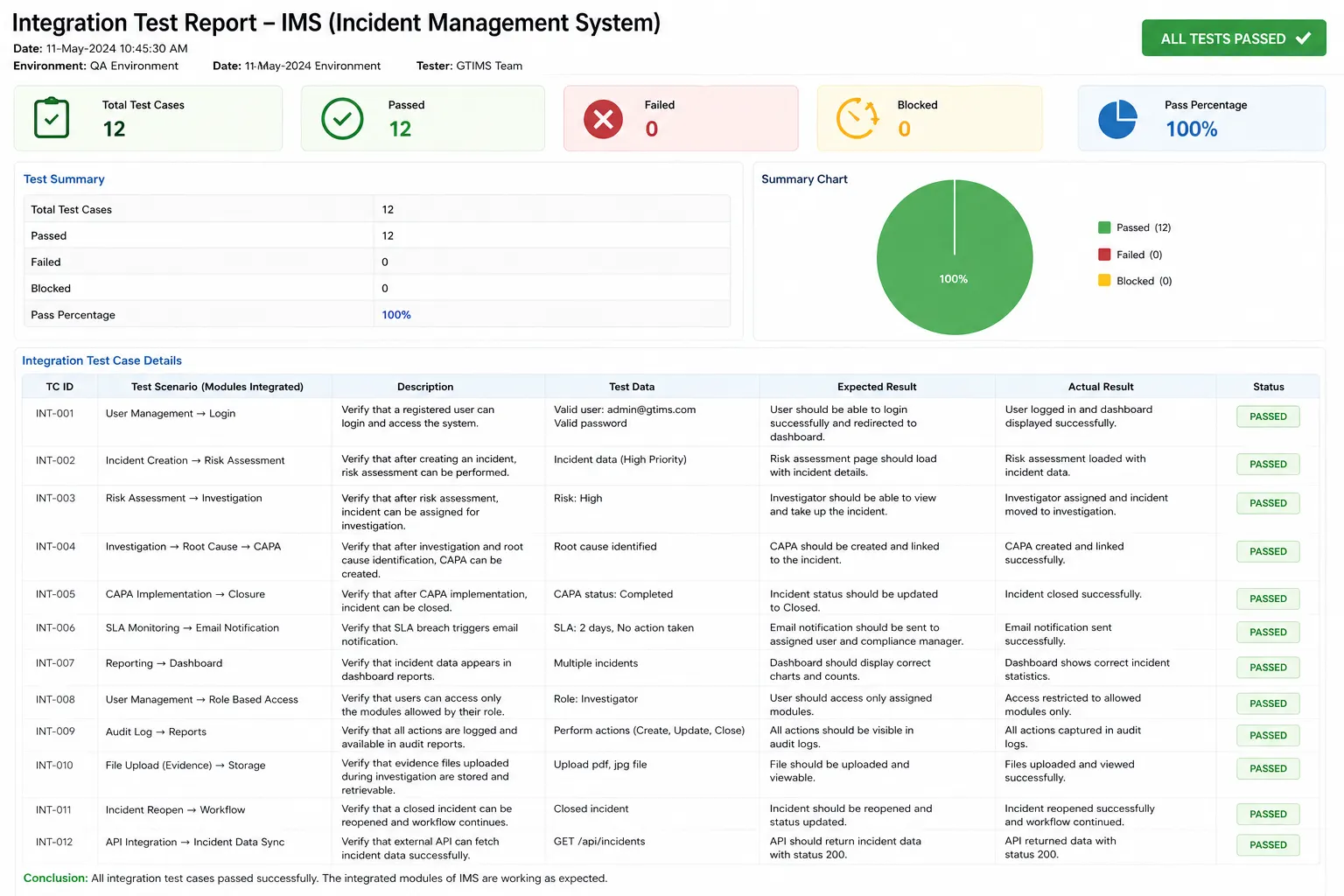
Integration Testing | Resolvex
✅ QA Report (Test Cases)
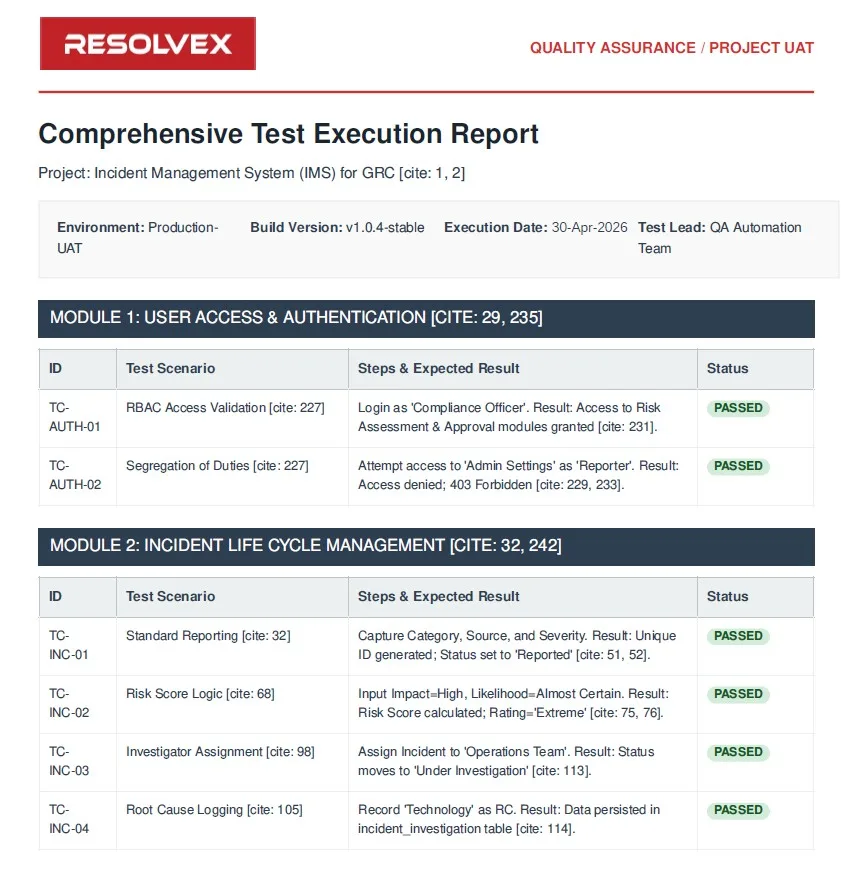
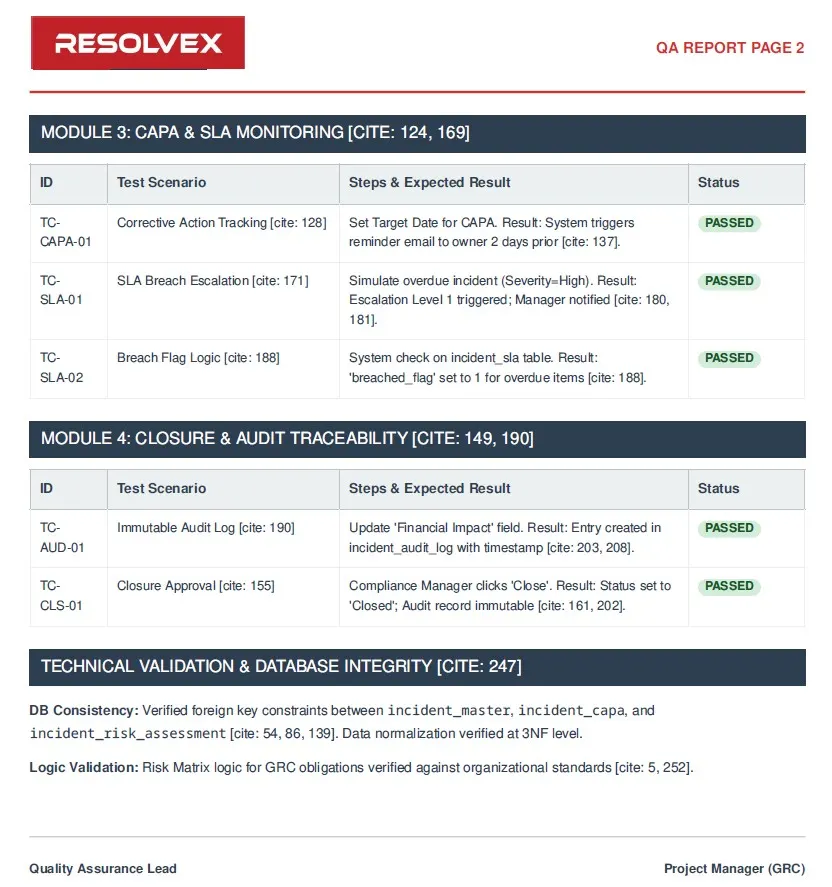
QA Report Sample | Resolvex
Deployment
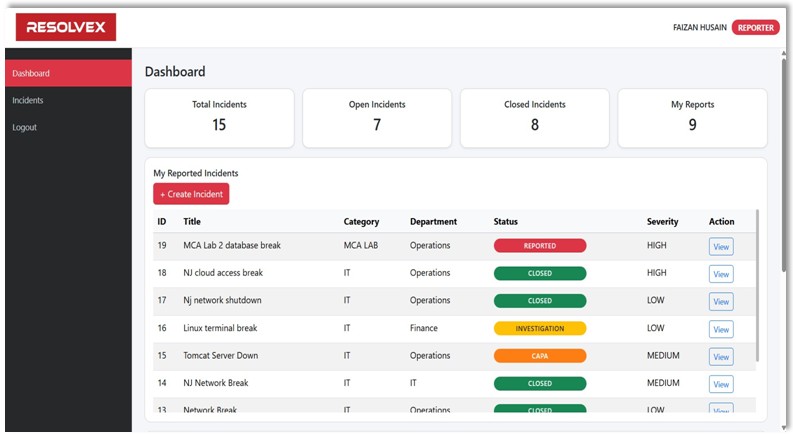
Production deployment and monitoring setup | Resolvex
Demo Video
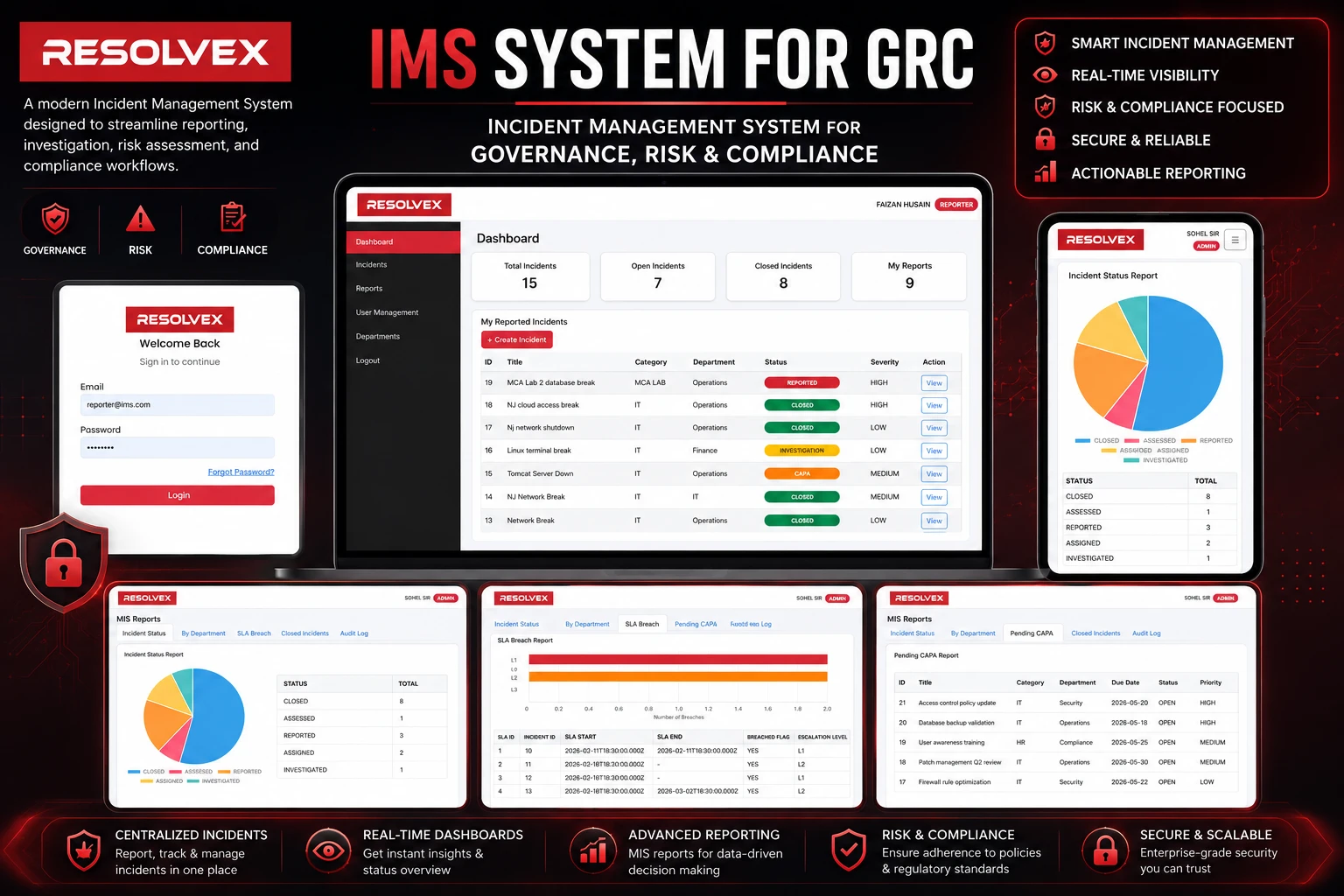

Dynamic Blog Posting Application
+Overview
A dynamic blog posting platform that allows users to create, manage, and publish blog content through a responsive and user-friendly interface.
Features
- - User registration and login
- - Create, edit, and delete blog posts
- - Category-based blog organization
- - User Authentication
- - Responsive dashboard
Requirement Understanding
- 01. User authentication and session management
- 02. Blog creation and publishing system
- 03. Category-wise blog organization
- 04. Responsive and user-friendly interface
- 05. Signup/Login functionality
Planning & Architecture
- 01. MVC-based application structure
- 02. Servlet and JSP integration planning
- 03. PostgreSQL database schema design
- 04. Session and authentication flow
- 05. Frontend and backend module separation
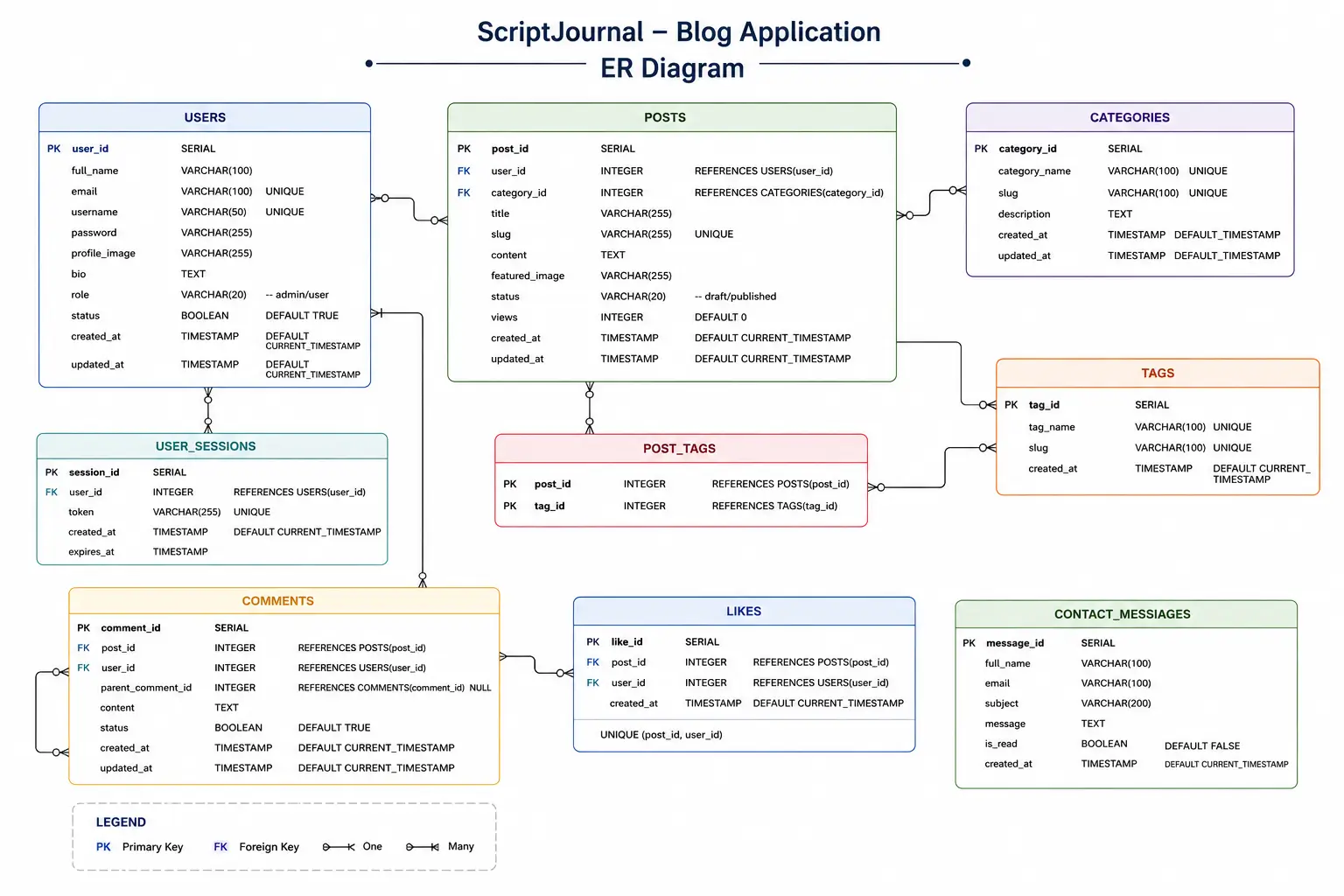
ER diagram | ScriptJournal
Github Code Snippets
faizan-husain
Software Developer<%@ page import="java.text.SimpleDateFormat" %>
<%@page contentType="text/html" pageEncoding="UTF-8"%>
<!DOCTYPE html>
<html>
<head>
<meta charset="UTF-8">
<meta name="viewport" content="width=device-width, initial-scale=1">
<title>ScriptJournal | Blog</title>
</head>
<body>
<a class="nav-link dropdown-toggle" href="#" data-toggle="dropdown">Categories</a>
<div class="dropdown-menu">
<a class="dropdown-item active" href="#" onclick="getPosts(0,this)">All Posts</a>
<%
PostDao d = new PostDao(ConnectionProvider.getConnection());
ArrayList<Category> list1 = d.getAllCategories();
%>
<a href="#" onclick="getPosts(<%=cc.getCid()%>,this)" class="dropdown-item c-link"><%=cc.getName()%></a>
</div>
</body>
</html>/* CSS STYLESHEET */
body{
/* background-color: red; */
}
.primary-background{
/* background: #795548!important; */
background:#5D4037!important;
}
.secondary-background{
background:#E9ECEF!important;
}
.profile-img{
width:120px;
height:120px;
object-fit:cover;
border:2px solid #007bff;
}
// LOAD POSTS BY CATEGORY
// short function code in AJAX JavaScript

function getPosts(cid,temp){
    $(".c-link").removeClass(
        "active"
    );
    $.ajax({
        url:"load_posts.jsp",
        data:{cid:cid},
        success:function(data){
            $("#post-container")
            .html(data);
            $(temp).addClass(
                "active"
            );
        }
    });
}// USER ENTITY CLASS
public class User {
private int id;
private String name;
private String email;
private String password;
private String gender;
private String about;
private Timestamp dateTime;
private String profile;
// constructor
public User(int id, String name, String email,
String password, String gender, String about, Timestamp dateTime){
this.id = id;
this.name = name;
this.email = email;
this.password = password;
this.gender = gender;
this.about = about;
this.dateTime = dateTime;
}
// setters getters here
}// SAVE BLOG POST INTO DATABASE
public boolean savePost(Post p){
boolean f = false;
try{
String q = "insert into posts(pTitle,pContent,pCode,pPic,catId,userId) values(?,?,?,?,?,?)";
PreparedStatement pstmt = con.prepareStatement(q);
pstmt.setString(1, p.getpTitle());
pstmt.setString(2, p.getpContent());
pstmt.setString(3, p.getpCode());
pstmt.setString(4, p.getpPic());
pstmt.setInt(5, p.getCatId());
pstmt.setInt(6, p.getUserId());
pstmt.executeUpdate();
f = true;
}catch(Exception e){
e.printStackTrace();
}
return f;
}// USER LOGIN SERVLET
@WebServlet(
"/LoginServlet"
)
public class LoginServlet extends HttpServlet {
protected void doPost(HttpServletRequest req,HttpServletResponse res){
String email = req.getParameter("email");
String password = req.getParameter("password");
// LOGIN VALIDATION
UserDao dao = new UserDao(ConnectionProvider.getConnection());
User user = dao.getUserByEmailAndPassword(email,password);
}
}<!-- WEB APPLICATION CONFIGURATION -->
<web-app>
<servlet>
<servlet-name>LoginServlet</servlet-name>
<servlet-class>com.techblog.servlets.LoginServlet</servlet-class>
</servlet>
<servlet-mapping>
<servlet-name>LoginServlet</servlet-name>
<url-pattern>/LoginServlet</url-pattern>
</servlet-mapping>
<servlet>
<servlet-name>UserServlet</servlet-name>
<servlet-class>com.techblog.servlets.UserServlet</servlet-class>
</servlet>
<servlet-mapping>
<servlet-name>UserServlet</servlet-name>
<url-pattern>/UserServlet</url-pattern>
</servlet-mapping>
</web-app># ScriptJournal
Modern blog posting application
developed using JSP, Servlet,
Bootstrap, JavaScript and PostgreSQL.
## Features
- User Authentication
- Blog Posting
- Categories
- Responsive UI
## Technology Stack
Java • JSP • Servlet • PostgreSQL
Bootstrap • JavaScript
this is sample code, click @github to get full repository
Testing
Performed comprehensive testing of the ScriptJournal blog application to ensure smooth functionality, secure authentication, reliable database operations, and responsive user experience. Conducted CRUD, validation, session management, and cross-browser testing while optimizing performance and resolving application issues for stable and efficient system behavior.
Snaps
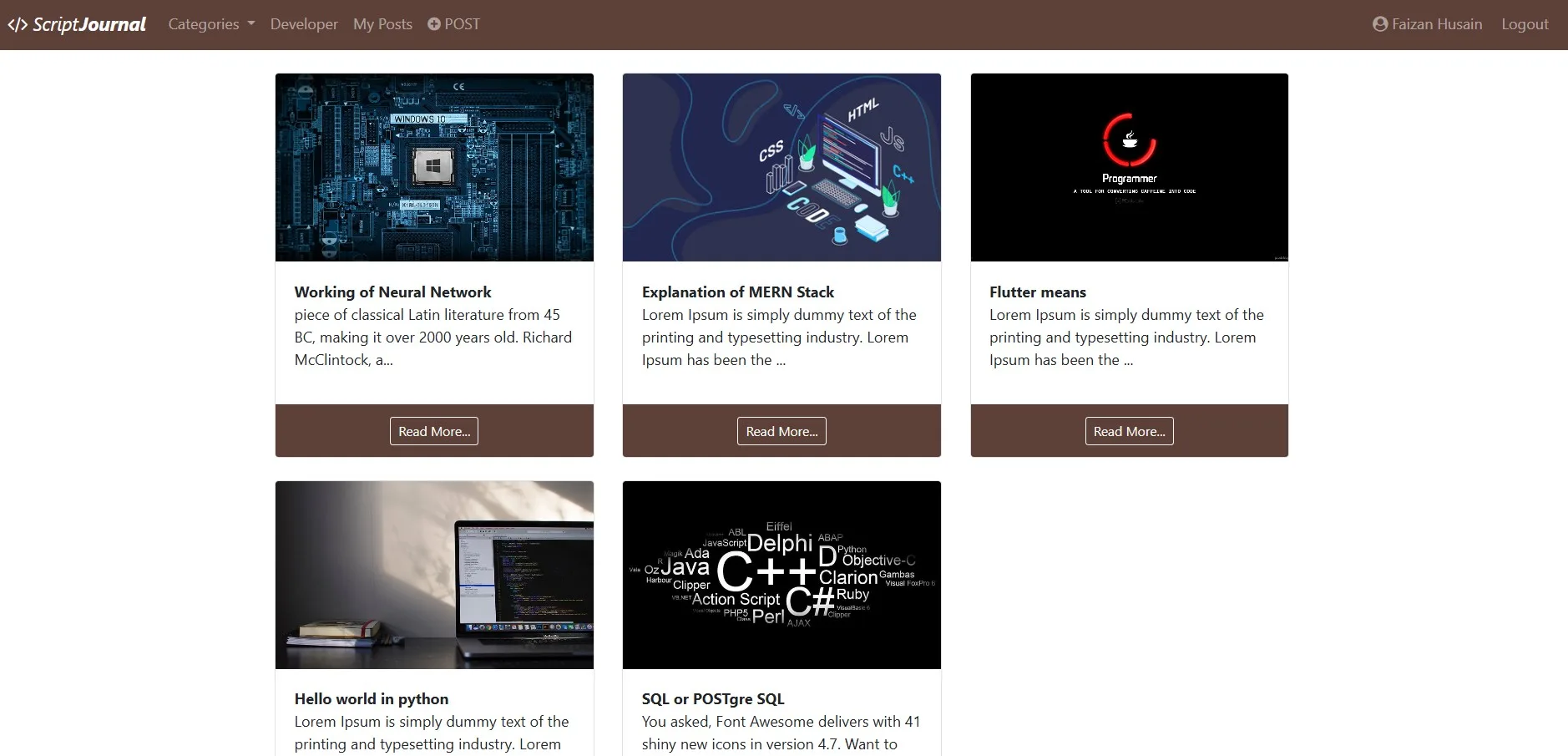
Dashboard | ScriptJournal
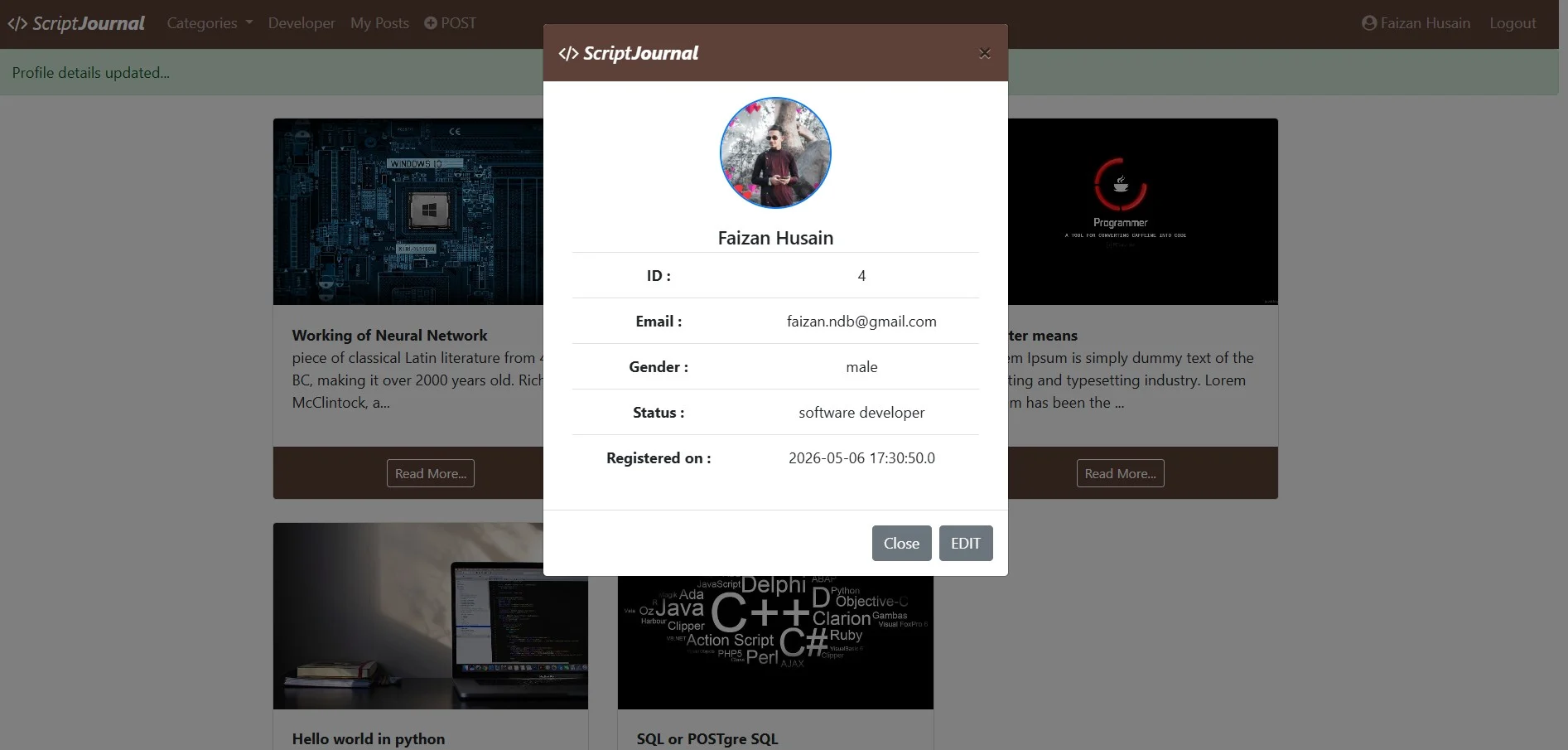
Logged In Profile | ScriptJournal
Demo Video
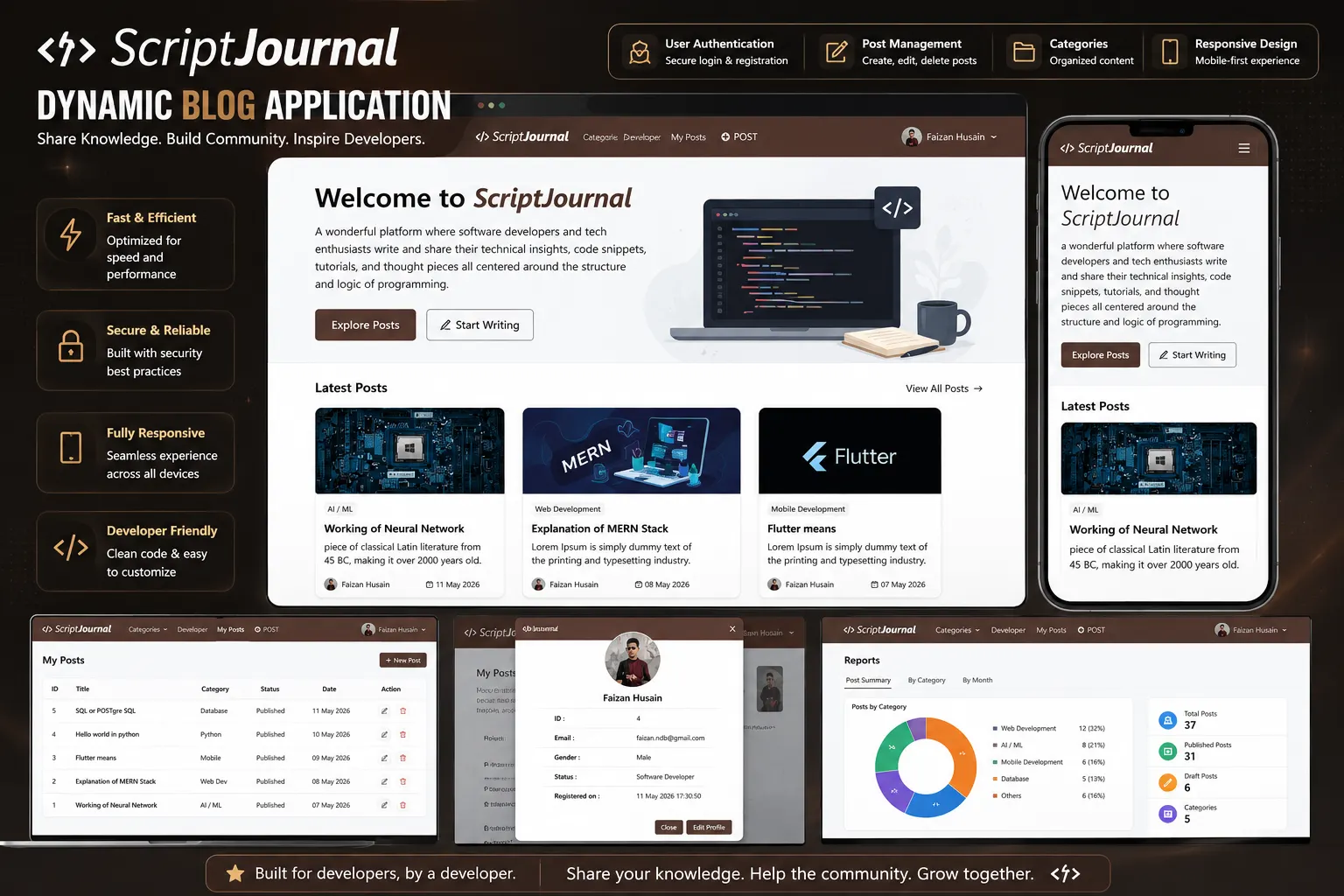

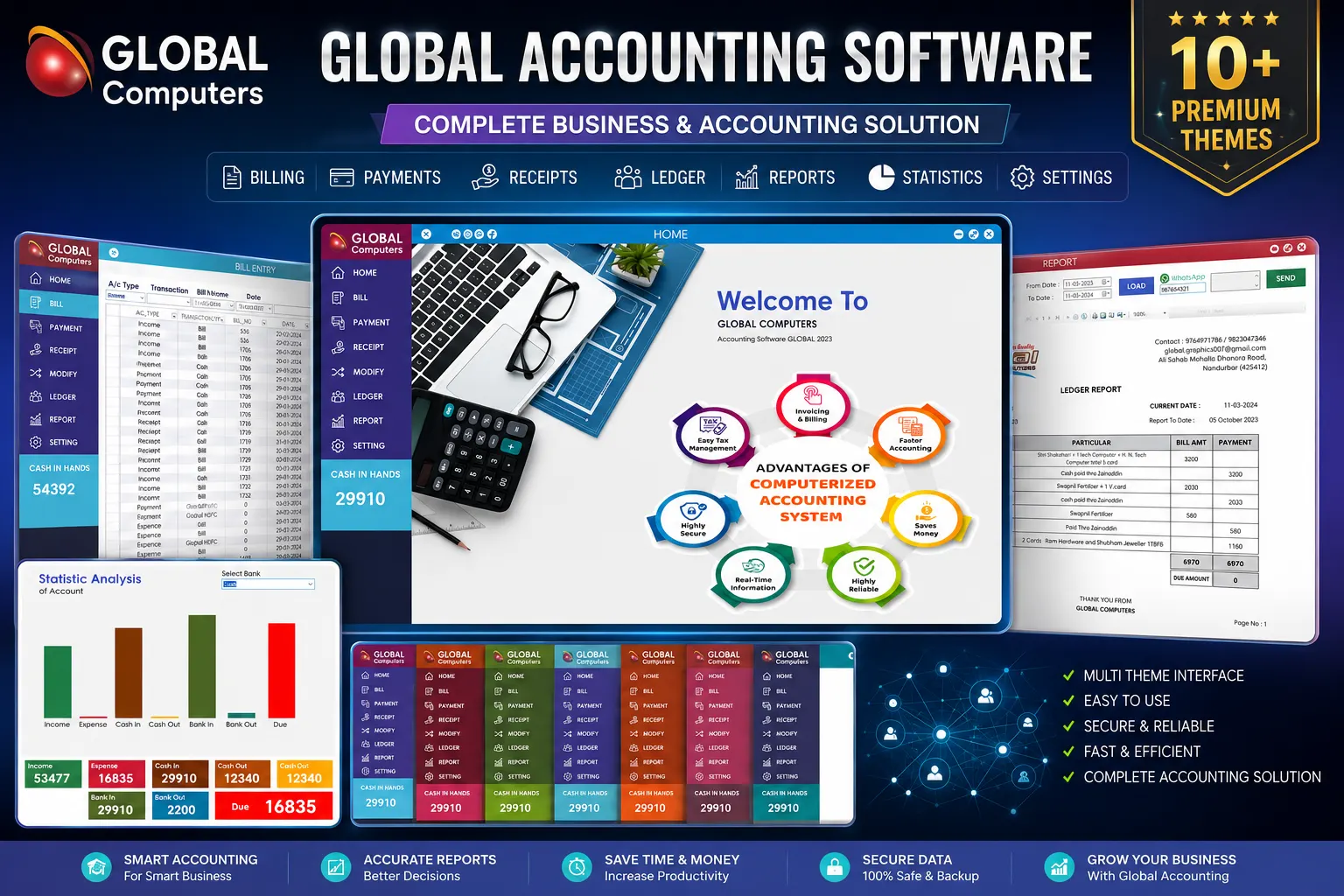
Accounting & Billing Software
+Overview
A desktop-based account management system developed for Global Computers to manage financial records, customer transactions, billing, and reporting operations efficiently.
Features
- - Customer account management
- - Billing and invoice generation
- - Transaction and payment tracking
- - Dynamic RDLC report generation
- - Ledger management
- - Search and filtering functionality
- - Save File (Backup of Data).
- - Responsive desktop interface
- - Automatically Statistics Analysis
- - Send data through Whatsapp
- - OTP based Authentication
- - Factory Reset
Tools & Technology
- - C# Programming
- - .NET Framework
- - MsSQL
- - SSMS DB Framework
- - RDLC Reports
- - XML, Windows Forms
Requirement Understanding
- Desktop-based accounting solution designed for efficient billing,
transaction management, and dynamic financial reporting.
- client
requirements for managing customer accounts, billing, financial
transactions, and reporting operations through a centralized and efficient
desktop-based accounting system.
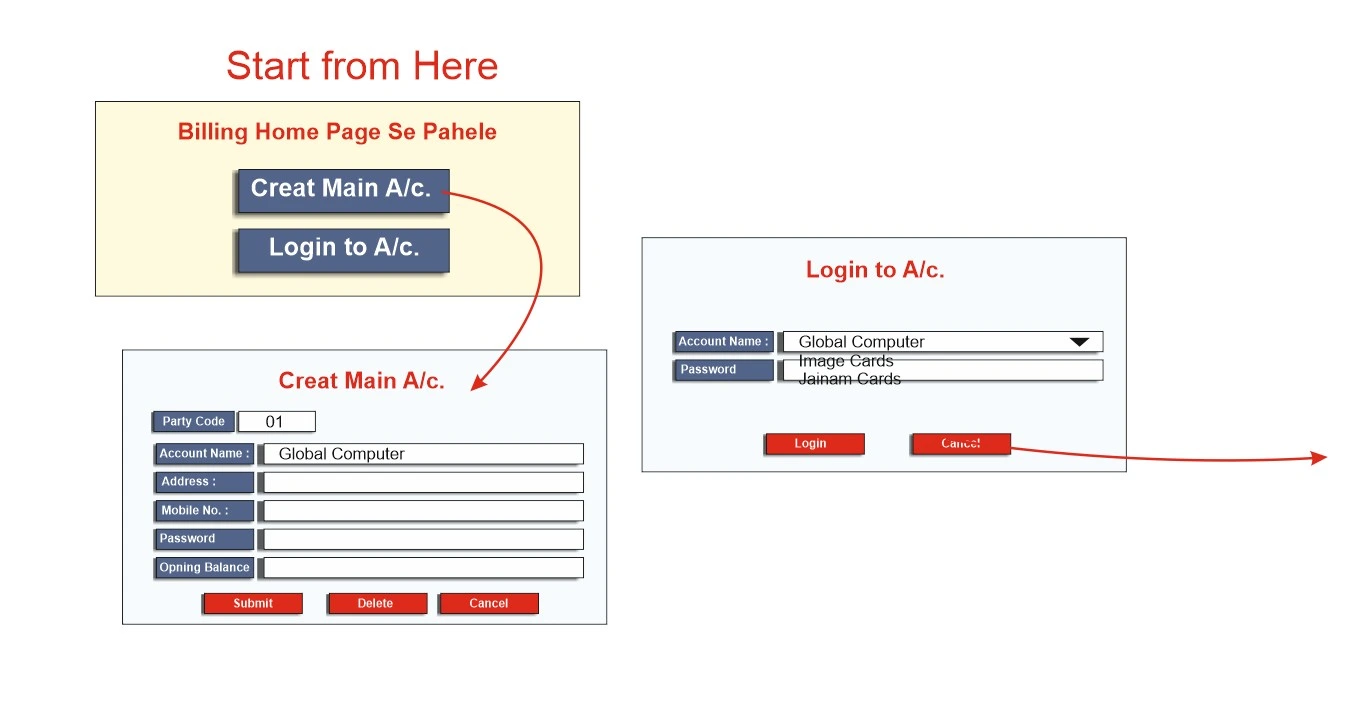
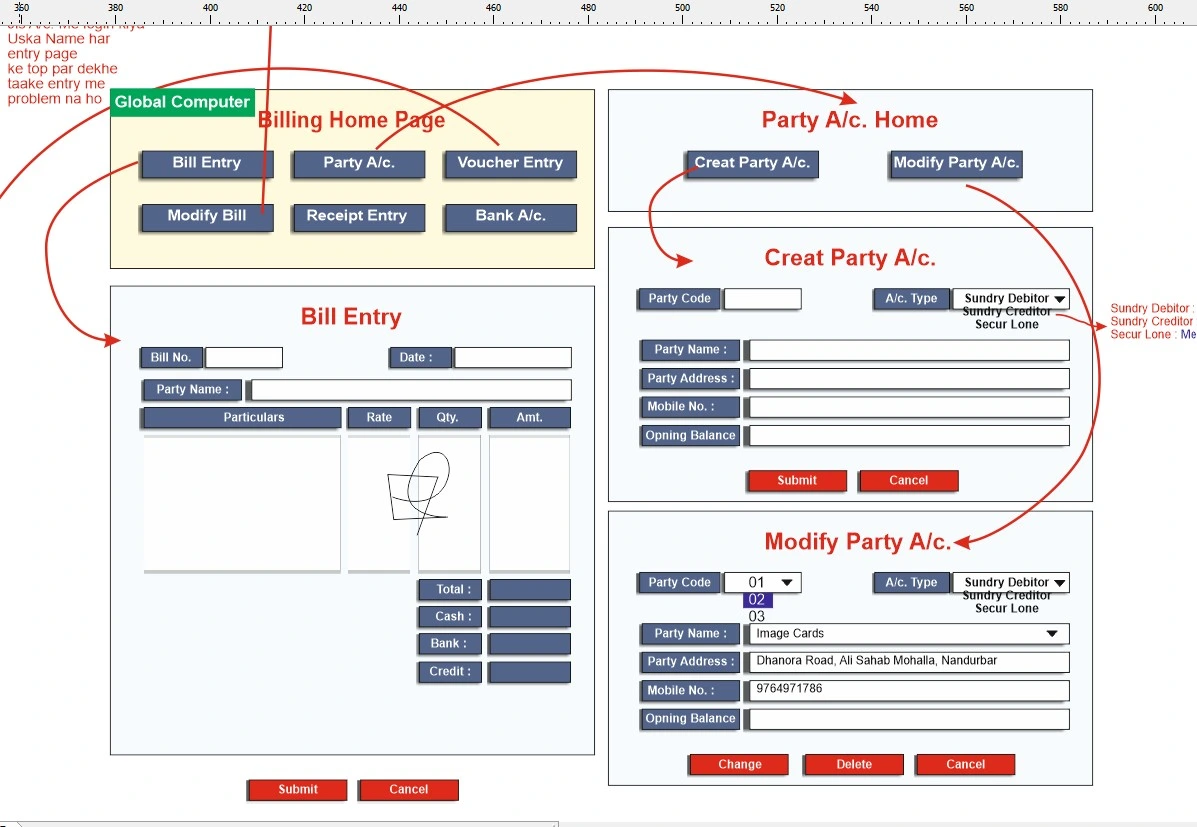
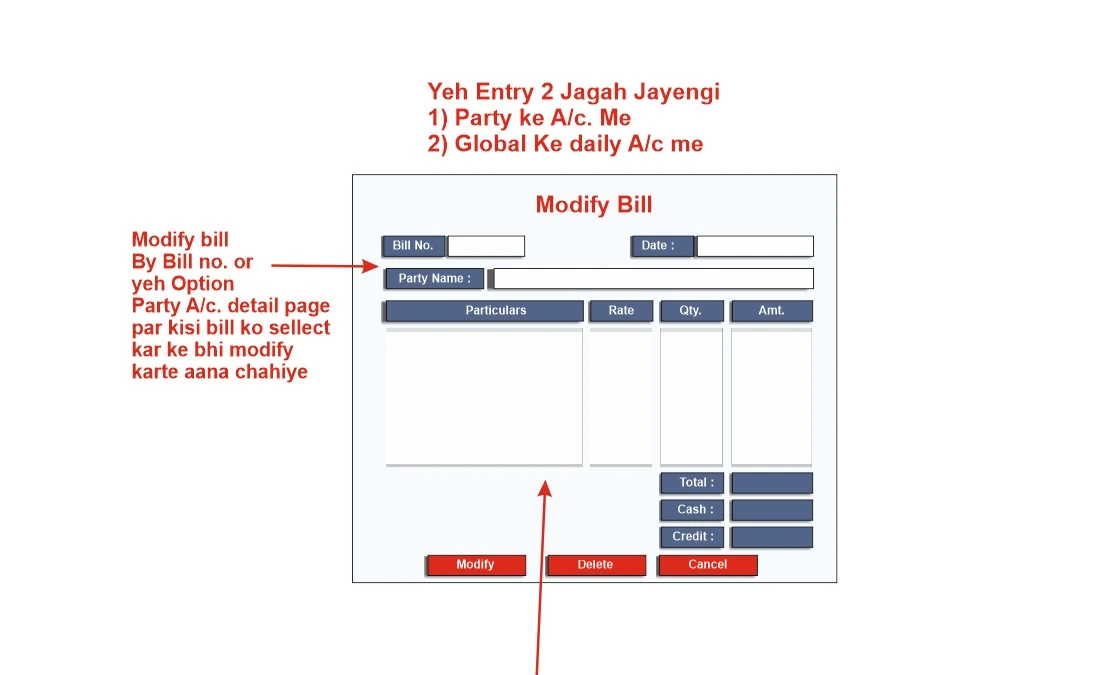
user's requirements and workflow | Global Account
Planning & Architecture
✅ Use Case Diagram
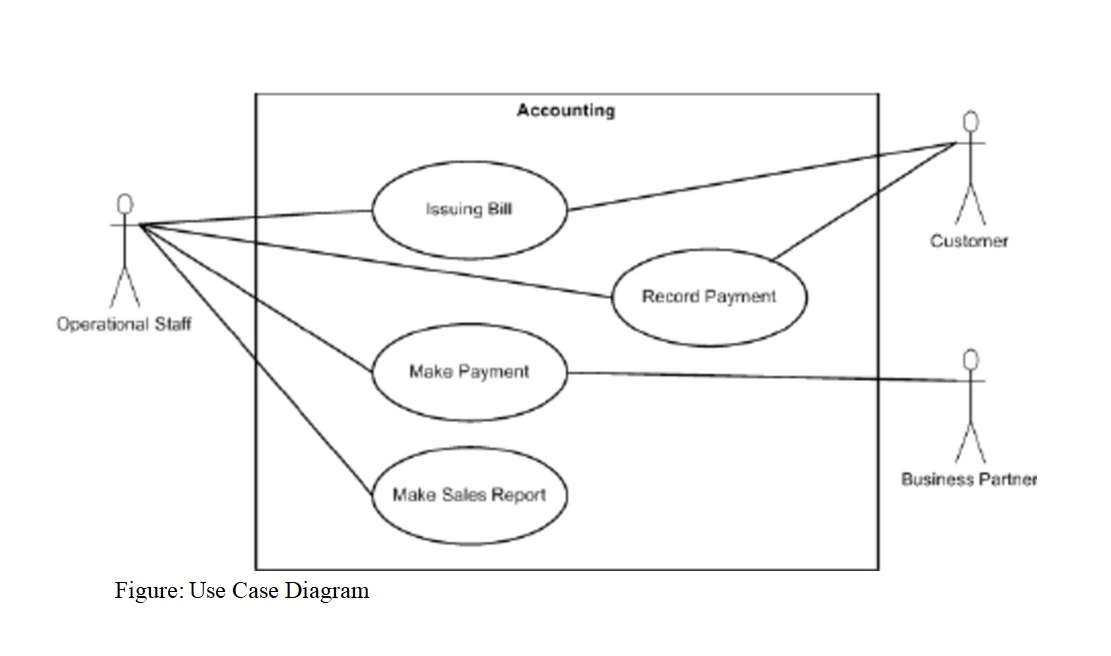
Use Case Diagram | Global Account
✅ Sequence Diagram
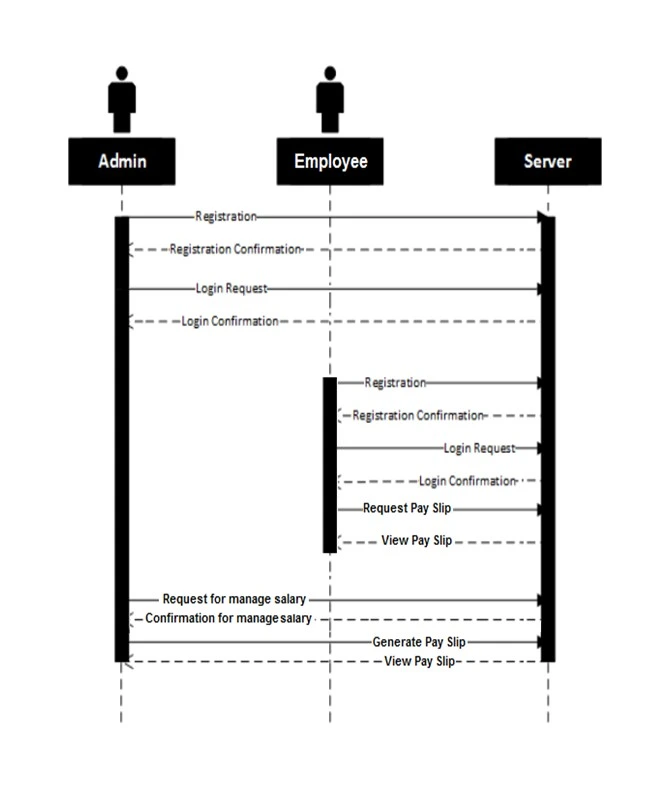
Sequence Diagram | Global Account
✅ Activity Diagram
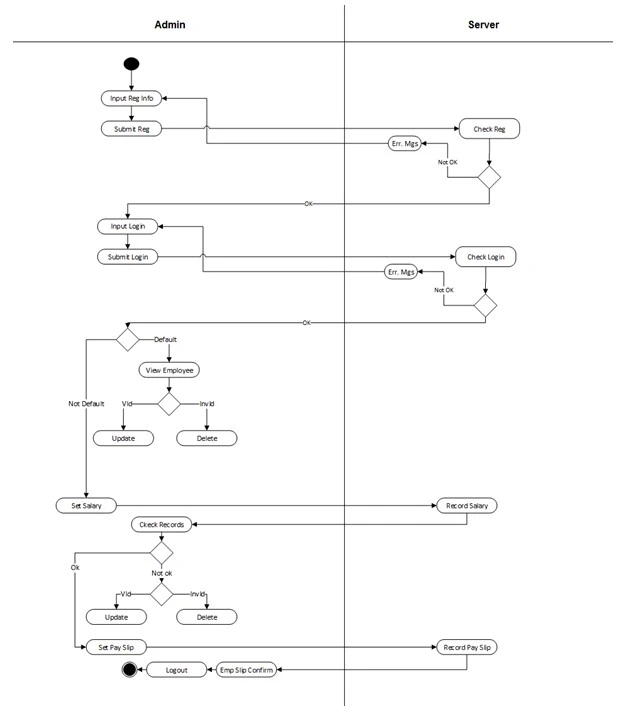
Activity Diagram | Global Account
✅ Database Architecture
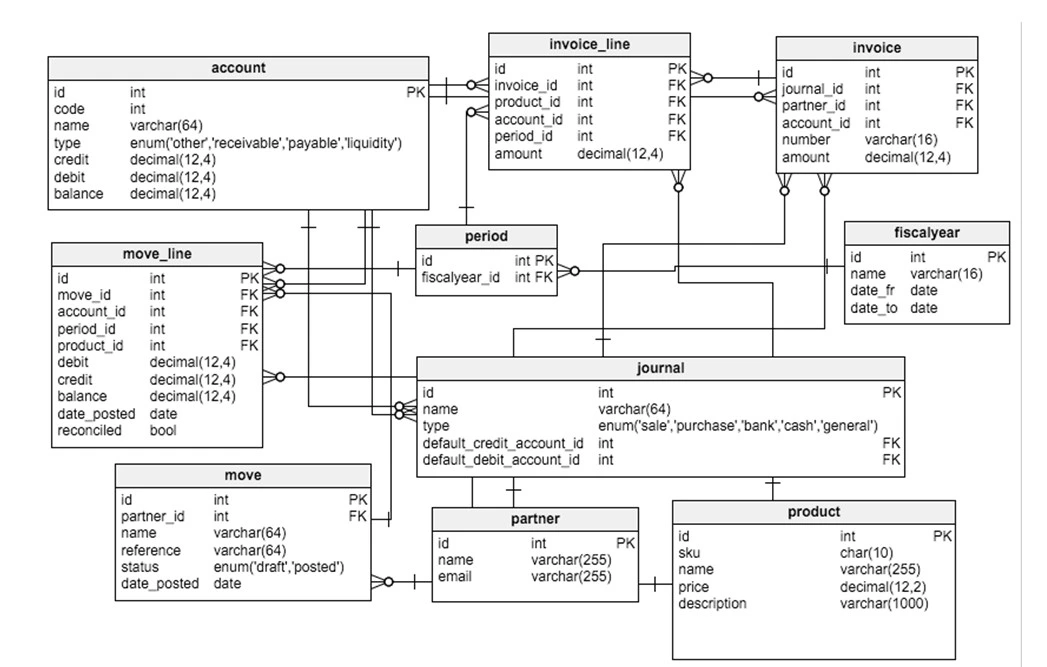
Database Architecture | Global Account
✅ DB Design
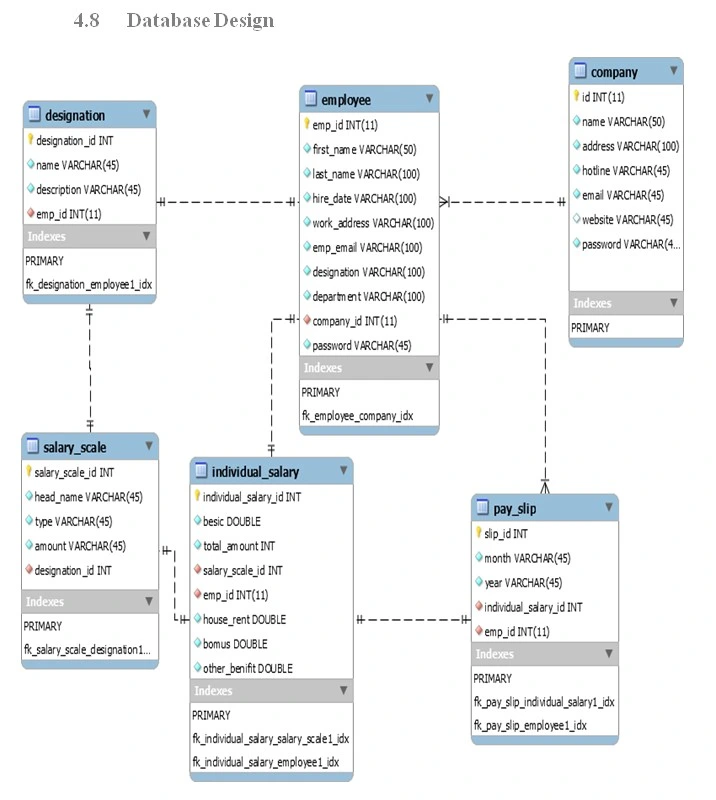
DB Design | Global Account
✅ Class Design
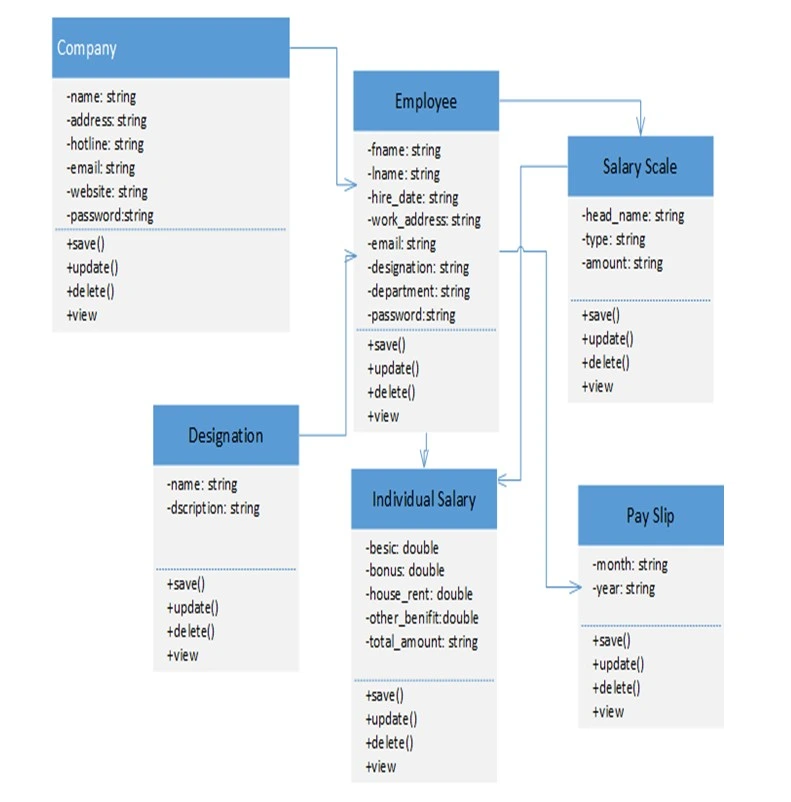
Class Design | Global Account
Github Code Snippets
faizan-husain
Software Developer// USER LOGIN FORM (C# Programming)
private void btnLogin_Click(object sender,EventArgs e){
String username = txtUsername.Text;
String password = txtPassword.Text;
SqlConnection con = new SqlConnection(connectionString);
String q = "select * from users where username=@u and password=@p";
SqlCommand cmd = new SqlCommand(q, con);
cmd.Parameters.AddWithValue("@u",username);
cmd.Parameters.AddWithValue("@p",password);
con.Open();
SqlDataReader dr = cmd.ExecuteReader();
if(dr.Read()){
Dashboard db =new Dashboard();
db.Show();
this.Hide();
}
}// STATISTICS ANALYSIS
private voidloadDashboard(){
SqlConnection con = DbConnection.getConnection();
String q = "select count(*) from customers";
SqlCommand cmd = new SqlCommand(q, con);
con.Open();
int totalCustomers = (int)cmd.ExecuteScalar();
lblCustomers.Text = totalCustomers.ToString();
String invoiceQuery = "select count(*) from invoices";
SqlCommand invoiceCmd = new SqlCommand(invoiceQuery,con);
int totalInvoices = (int)invoiceCmd.ExecuteScalar();
lblInvoices.Text = totalInvoices.ToString();
con.Close();
}// SQL-SERVER DB CONNECTION
public class DbConnection {
private static SqlConnection con;
public static SqlConnection getConnection(){
if(con == null){
String connectionString ="Data Source=.;Initial Catalog=AccountingDB;Integrated Security=True";
con = new SqlConnection(connectionString);
}
return con;
}
public static void close Connection(){
if(con != null
){
con.Close();
}
}
}// CUSTOMER MODEL CLASS
public class Customer {
public int Id {
get; set;
}
public string Name {
get; set;
}
public string Email {
get; set;
}
public string Phone {
get; set;
}
public string Address {
get; set;
}
public DateTime
CreatedDate {
get; set;
}
}// short version of rdlc report code
using Microsoft.Reporting.WinForms;
public void LoadGlobalComputersInvoice(string invNo)
{
// Setup ReportViewer
reportViewer1.LocalReport.ReportPath =
"Reports/InvoiceReport.rdlc";
reportViewer1.LocalReport.DataSources.Clear();
// Add DataSources
reportViewer1.LocalReport.DataSources.Add(new ReportDataSource(
"dsHeader",header
)
);
reportViewer1.LocalReport.DataSources.Add(new ReportDataSource(
"dsDetails",details
)
);
// Report Parameters
ReportParameter[] para = new ReportParameter[] { \
new ReportParameter(
"CompanyName","Global Computers"
)
};
reportViewer1.LocalReport.SetParameters(para);
reportViewer1.RefreshReport();
}<!-- APPLICATION CONFIGURATION -->
<configuration>
<connectionStrings>
<add
name="AccountingDB"
connectionString="Data Source=.;Initial Catalog=GlobalAccountingDB;Integrated Security=True"
providerName="System.Data.SqlClient"
/>
</connectionStrings>
<startup>
<supportedRuntime
version="v4.0"
sku=".NETFramework,Version=v4.8"
/>
</startup>
</configuration># Global Accounting Software
Desktop accounting software developed using C#, .NET Framework,
MsSQL and RDLC Reports.
## Features
- Customer Account Managemen
- Billing and invoice generation
- Transaction and payment tracking
- Dynamic RDLC report generation
- Ledger management
- Search and filtering functionality
- Save File (Backup of Data).
- Statistics Analysis
- Send data through Whatsapp
- OTP based Authentication
- Factory Reset
## Technology Stack
C# • .NET • MsSQL • RDLC
Windows Forms • XML
Developerd by :
Faizan Husain 2023this is sample code, click @github to get full repository
Testing
~ Unit Testing
test software by which individual units of source code, Sets of one or more computer program modules together with associated control Data, usage procedures, and operating procedures, are tested to determine whether They are fit for use.
~ System Testing
System Testing has been done after finishing this project. We used to verify that it faces individualized. We got some error at the time of system testing. After getting error we tried to resolve it.
~ DB Testing
test database relation mapping and the flow of data between tables.
~ Acceptance Testing
Acceptance Testing or beta testing is executed after System Testing and before making the system available for actual use. We have done beta testing of the system.
Deployment
Created and configured application setup packages using Visual Studio deployment tools to generate executable installer files for simplified software installation, deployment, and client-side system setup.
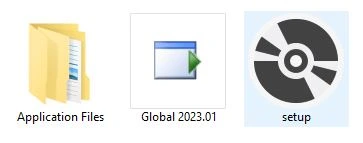
Setup Files | Global Account
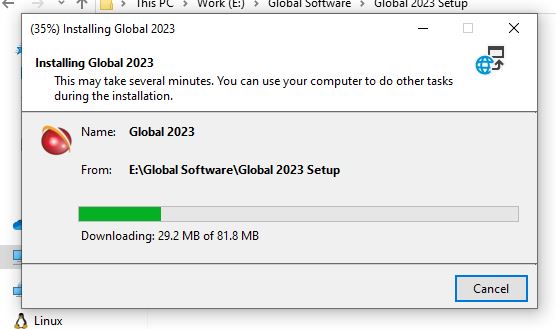
Setup installation | Global Account
Demo Video